Rhinestone Template Design FOOTPRINTS: A Sparkling Digital Blueprint
There’s something uniquely satisfying about creating a custom, sparkly design that catches the light and draws the eye. For crafters, small business owners, and DIY enthusiasts, the ability to produce professional-looking rhinestone apparel and accessories from a home studio is a game-changer. It all starts with the right digital foundation, a template that translates a creative vision into a precise, workable pattern. This is where a well-crafted digital design file becomes your most valuable asset, turning a simple idea into a dazzling reality.
Understanding Your Digital Downloadable Asset
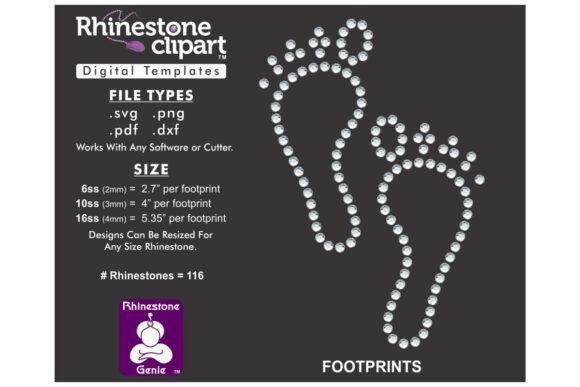
When you acquire the Rhinestone Template Design FOOTPRINTS, you’re not waiting for a package to arrive in the mail. This is a digital product, an immediate download that puts creative control directly into your hands. You’ll receive a zipped folder containing the design in multiple versatile file formats: DXF, SVG, PNG, and PDF. This variety is intentional, ensuring compatibility with a wide range of graphic design and CNC software. Whether you use Silhouette, Cricut, Brother’s ScanNCut, Sure Cuts A Lot (SCAL), CorelDRAW, Adobe Illustrator, or other popular platforms, you’ll find a file type that integrates smoothly into your workflow.
The design itself is optimized for ss10 rhinestones, which have a standard diameter of .13 inches or 3.3mm. However, one of the key strengths of a vector-based template like this is its scalability. You are not locked into a single size. By resizing the template proportionally within your software, you can adapt it to work with different rhinestone sizes, from tiny ss6 stones for delicate details to larger ss16 or ss20 stones for bold statements. A practical tip: always perform a test cut on scrap material after resizing. Cutters and blade settings vary, and this quick test ensures your machine creates the holes at the perfect diameter for your chosen rhinestones to sit snugly.
Creative Applications Beyond the Obvious
While the immediate use for a footprint design is adorable baby apparel—think onesies, bibs, and blankets—its potential extends far into branding and thematic design for businesses and events. Consider a pediatric clinic, a children’s clothing boutique, or a baby photography studio. Incorporating a subtle rhinestone footprint motif into staff uniforms, client gift bags, or promotional materials creates a cohesive, memorable brand identity that speaks directly to their audience.
For event planners and marketers, this design template can be a standout element. Use it to create custom merchandise for a charity walk supporting infant health, sparkling decorations for a baby shower, or unique signage for a family-focused festival. The tactile, three-dimensional quality of rhinestones adds a layer of luxury and engagement that flat printing cannot match. It transforms a simple t-shirt or tote bag into a keepsake.
From Template to Tangible Product: A Practical Guide
Working with the downloaded files is a straightforward process designed for clarity. After unzipping the folder, your first step is to import or upload the correct file type into your chosen software application. If you’re unsure which format your program prefers, a good strategy is to test them all. You’ll quickly discover which one delivers the cleanest lines and easiest manipulation for your specific setup.
Once imported, you can resize the design as needed. Remember the proportional resizing rule to maintain the integrity of the footprint shape. The template functions as a set of individual components or a complete pattern. It’s important to note that this is not a typable font where you type letters on a keyboard. Instead, you will pick and place the individual footprint elements to construct your final design layout. This pick-and-place method offers tremendous creative freedom, allowing you to create patterns, borders, or isolated accents exactly where you want them.
Maximizing Impact with Professional Execution
The difference between an amateur project and a professional product often lies in the details of execution. With a rhinestone template, precision is key. Ensure your cutting mat is clean and your blade is sharp for the most accurate cuts, especially when working with the intricate negative spaces of a design. After cutting your template material, the process of weeding—removing the excess material—requires patience but is crucial for a clean final look.
When applying rhinestones, using a quality adhesive and a consistent technique will result in a durable, washable product. For those creating items for sale, this attention to quality directly impacts customer satisfaction and brand reputation. A well-executed rhinestone design feels premium and conveys a sense of care and craftsmanship, enhancing the perceived value of any apparel or accessory it adorns. It’s a tangible asset that supports visual consistency across product lines, strengthening brand recognition one sparkling item at a time.